
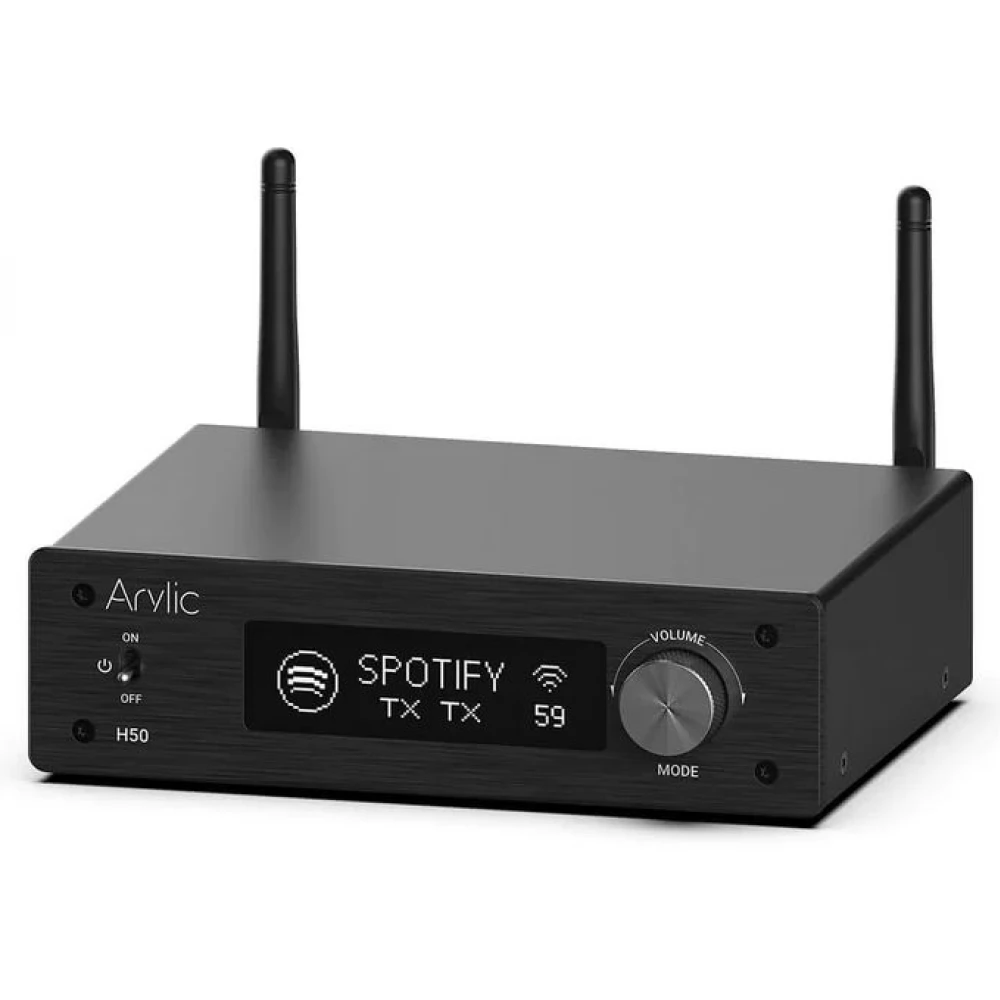
ARYLIC H50 Wireless Stereo Amplifier
121 290 Ft

Product description
The H50 is a slightly improved version of the RAKOIT/Arylic M50, released a few months earlier. The device can now be controlled in 4 different ways:
- With the Arylic 4stream app (Android and iOS) or any other Linkplay player app (e.g. WiiM Home)
- With the included infrared remote control (limited functionality)
- Entering the H50 web interface from a web browser (limited functionality)
- With voice commands given to the Amazon Alexa digital assistant
The H50 knows practically everything that can be expected from a modern music center, as well as what we have already seen with Arylic players:
I. Playing online stream services, internet radios
Currently (August 2023), the following free and paid music services can be played directly with the H50 (if they are available in the given geographic location): Amazon Music, Napster, Pandora, QQFM, QQMusic, Qobuz, Radio Paradise, Spotify (also Premium) , TIDAL (also HiFi), TuneIn, vTuner, iHeartRadio.
In addition to the above (where TuneIn and vTuner provide an up-to-date catalog of approximately all known Internet radio stations in the world), you can find all the English BBC radio channels in a separate menu. You can specify any HTTP stream as the playback source.
II. Play your own music files from the network and USB storage
The H50 can play up to 24-bit, 192 kHz files stored in the following formats:
Lossy compression: MP3, AAC, AAC+, WMA
Lossless compressed or uncompressed: ALAC, APE, WAV, FLAC
It can access files from computers or NAS servers in our home computer network via the DLNA protocol. However, you can also use a USB flash drive connected directly to the USB port of the H50 (formatted to the FAT, FAT32 or NTFS file system), and its contents can also be browsed in the mobile remote control application. Of course, music files on mobile phones and tablets can also be played on the H50 via the 4stream (or even WiiM Home) application.
III. External DAC mode for computer, media player
Using the USB Type-C connector on the back, the H50 can also be used as a desktop DAC with any standard USB Audio Class 1 DAC device, e.g. with our computer, tablet. Based on this standard, however, only max. 16-bit and 48 kHz sampling frequency can be used. In this case, the music coming from the computer will also be played on other players connected to a multiroom group (synchronized) with the player operating in DAC mode.
ARC. DLNA Media Renderer and Apple AirPlay(2) player
The H50 appears on our computer network as a standard DLNA player and as an AirPlay 2 network music player. So we can stream directly to it from a variety of sources, even in lossless quality. Windows, countless Android applications, macOS, iOS, iPad OS can all be used as audio output.
A. Bluetooth speaker
Like any Bluetooth speaker or speaker, the H50 also appears on mobile phones and computers capable of streaming to Bluetooth players after the usual pairing. The Bluetooth functions here are provided by a Qualcomm audio processor, which even supports aptX-HD transmission!
VI. Digital amplifier
Any stereo analog signal source (e.g. TV, FM radio, CD player) can be connected to the RCA inputs on the back panel, and in a multiroom environment you can even play synchronously on the other players. However, there is also an optical digital input on the H50, so you can use the ESS The quality of Saber ES9023P DAC. A game console, TV, CD player with an optical output should be connected here rather than to the analog input! Of course, this source can also be played on synchronous players in up to 12 rooms of the apartment, so you can follow even the TV An active sub-woofer can be connected to its dedicated subwoofer output, supplementing the deep sounds of the pair of speakers it drives.
VII. Phono (analog record player, MC/MM) amplifier
Compared to the M50, one important extra is the Phono in stereo input on the rear panel. Although the Arylic H50 also has a completely digital output stage, the manufacturer thought of those who also want to enjoy their music collection from analog audio media, specifically vinyl ("vinyl") records. They can directly connect a turntable chassis with either MM or MC pickups via a pair of stereo RCA connectors.
VIII. HDMI amplifier
Primarily for receiving the HDMI ARC output of TVs, an HDMI input has also been added to the back of the H50. Thus, if we are looking for a more serious sound system for our TV than a sound projector, Arylic's device is our partner in this as well. Its HDMI input does not decode DTS and Dolby formats, so it expects a PCM signal from the TV.
Summing up the differences compared to the slightly cheaper Arylic M50, we can say that the H50:
it no longer contains a line output (it has been replaced by a Phono input),
It also has an HDMI input,
its large OLED display supports manual operation,
its newer Bluetooth chip already supports aptX (16-bit/48 kHz) and even aptX-HD (24-bit/48
PRICE NOTIFICATION
NOTEBOOK SEARCH

OPINIONS
0.0
